· Onestop 22
BMW G30 LCI Coding
& Retrofit Guide
A practical guide to G30 retrofit coding, E-Sys, ISTA, FA/VO, modules, wiring, diagnostics, programming and vehicle-specific checks.
Start With The Complete Setup
BMW G30 retrofit coding is vehicle-specific. The correct procedure depends on the production date, current equipment, target parts, wiring, control units, software level and vehicle market.
This guide explains the practical coding workflow without pretending that one set of coding values works on every G30. The aim is to show what must be checked, which tools are used, when FA/VO coding is appropriate, when additional configuration or programming may be required and how the finished retrofit should be tested.
- What determines compatibility?
- Which tools are used?
- What does coding actually do?
- FA / VO and module coding
- How a G30 retrofit is coded
- Example: LCI lighting retrofit
- When FDL coding is relevant
- Coding vs programming
- Coding vs wiring
- Modules and electronics
- Diagnostics and final testing
- EU / US specification
- What to send before ordering
- Frequently asked questions
For the complete exterior project, see our BMW G30 Facelift Conversion Guide.
For the main component checklist, see our BMW G30 LCI Retrofit Parts Guide.
For front lighting, see our BMW G30 LCI Headlight Retrofit Guide.
For rear lighting, see our BMW G30 LCI Tail Light Retrofit Guide.
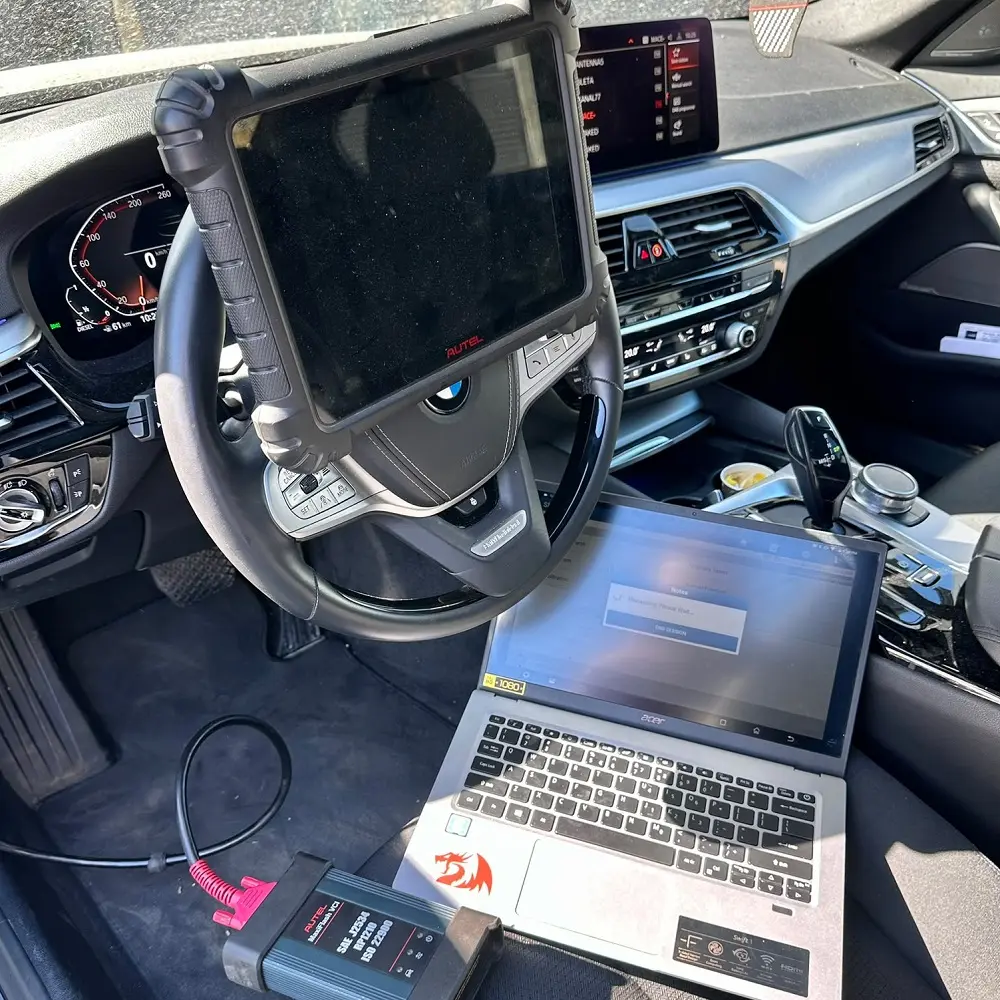
What Determines G30 Retrofit Compatibility?
The starting vehicle and target parts need to be considered together. Production details, current equipment, connectors, wiring, control units, software configuration and market specification can all affect the retrofit.
Two G30 vehicles can have the same body style and still require different retrofit planning because their equipment and electronic configuration are not identical.
Which Tools Are Used For G30 Coding?
There is no single tool that performs every retrofit task. The software should be selected according to the job: vehicle identification, coding, diagnosis, programming or calibration.
E-Sys
E-Sys is commonly used for G-Series vehicle configuration and coding work. It can be used to work with the vehicle order and code supported control units, depending on the retrofit and the applicable software data.
ISTA
ISTA is BMW diagnostic and service software used for vehicle tests, fault-memory checks, guided diagnostics and applicable service and programming procedures.
Diagnostic Interface
A suitable vehicle interface is required to communicate reliably with the car. The exact connection method depends on the software and vehicle setup.
Stable Power Supply
Programming and some other vehicle procedures should be performed with suitable voltage support. Low voltage or an interrupted connection can create additional problems.
What Does G30 Retrofit Coding Actually Do?
Coding configures supported control-unit functions so that the electronic system matches the vehicle configuration and installed equipment. It does not physically change the hardware.
Vehicle Configuration
The vehicle order is used as a configuration reference for equipment associated with the vehicle. If the retrofit changes the equipment represented by the vehicle configuration, that configuration may need to be reviewed.
Module Coding
After the applicable configuration is established, relevant control units can be coded so their configuration corresponds with the vehicle setup.
FDL Configuration
Some retrofits can require additional function-level configuration. FDL changes should only be made when the specific retrofit and software data justify them.
Diagnostic Verification
After coding, the vehicle should be tested for stored faults, communication problems and correct operation of the affected functions.
Vehicle Order And Module Coding
On G-Series BMW vehicles, the vehicle order is an important configuration reference. When a retrofit changes the equipment associated with the vehicle, the configuration may need to be reviewed before affected control units are coded.
FA and module coding are related but are not the same operation. The FA/vehicle order is a configuration reference, while coding applies the relevant configuration to control units.
What this means in practice
- Read and save the vehicle's current configuration before making changes.
- Identify the exact retrofit parts and compare them with the existing equipment.
- Determine whether the retrofit requires a change to the vehicle order or another configuration method.
- Confirm which control units are involved in the specific retrofit.
- Code only the relevant control units using the configuration that matches the confirmed hardware.
- Check whether additional function-level configuration is actually required.
- Determine whether the applicable BMW retrofit procedure also requires programming.
- Run diagnostics and verify the installed functions before considering the retrofit complete.
How A G30 Retrofit Is Coded
The following workflow is the practical difference between simply saying “the car needs coding” and actually preparing a vehicle for coding and, where required, programming.
1. Identify The Vehicle
Read the VIN and record the production date, current equipment, market specification and available vehicle data. Note the current software level when relevant.
2. Read Before Changing
Connect the vehicle with suitable diagnostic equipment and save the current configuration. This gives you a reference if something needs to be restored or compared later.
3. Identify The Retrofit
Confirm the exact lighting or electronic components being installed, including part version, connectors, wiring and any associated control electronics.
4. Decide The Configuration Method
Determine whether the retrofit requires a vehicle-order change, module coding, function-level configuration, programming, additional hardware or a combination of these.
5. Code Relevant Modules
Use the appropriate coding software and code only the control units required by the confirmed retrofit. Do not apply unrelated changes.
6. Check For Programming
Do not assume that every retrofit requires programming. At the same time, do not assume that coding alone is sufficient. Some specific BMW retrofit procedures explicitly require programming and coding, so the applicable procedure should be checked before work begins.
7. Use Suitable Voltage Support
When programming or another procedure requires stable vehicle voltage, use suitable voltage support and avoid interrupting the process because of low battery voltage or loss of connection.
8. Check Faults And Functions
After the coding or programming work, run a diagnostic test, review communication and configuration faults, and determine whether any remaining fault has a hardware or wiring cause.
9. Test The Retrofit
Test every affected function under normal operating conditions before the vehicle is returned to use.
Example: Pre-LCI G30 To LCI Lighting
A useful example is a pre-LCI G30 receiving LCI lighting. The example below explains the decision process rather than pretending that one coding value or one programming procedure applies to every vehicle.
| Step | What to determine | Why it matters |
|---|---|---|
| Vehicle | Production date, VIN, market and current equipment | G30 configurations vary by production period and equipment |
| Existing lights | Current light type and electrical connections | The starting system determines the retrofit path |
| Target lights | Exact LCI light version and required electronics | Different light versions can require different hardware |
| Connectors | Connector type and pin functions | Physical fit does not prove electrical compatibility |
| Wiring | Required power, signal and communication connections | Coding cannot replace missing electrical connections |
| Control units | Which modules manage the affected functions | The involved modules depend on the vehicle and retrofit |
| FA / VO | Whether vehicle configuration needs to reflect the new equipment | Configuration should match the installed system |
| Module coding | Which control units need to be coded | Only relevant modules should be changed |
| FDL | Whether function-level changes are actually required | FDL coding is not automatically required for every retrofit |
| Programming | Whether the applicable retrofit procedure requires programming | Some BMW retrofit procedures require programming and coding, while others may only require configuration or coding |
| Diagnostics | Fault memory and communication status | Stored faults can reveal unresolved problems |
| Final test | All affected lighting functions | The retrofit is not finished until the system operates correctly |
When Is FDL Coding Needed?
FDL coding changes individual function parameters within a control unit. It should not be presented as a mandatory step for every G30 retrofit.
VO Coding First
Where the retrofit is represented correctly by the vehicle configuration, the appropriate control units may be coded from that configuration without manually changing individual parameters.
FDL Only If Required
If a specific supported function cannot be configured correctly through the normal vehicle configuration, additional function-level coding may be relevant.
No Universal Values
FDL names and available values can depend on the control-unit software and data version. A value copied from another vehicle should not be treated as universal.
Record Changes
If function-level changes are made, record what was changed so the vehicle can be returned to the previous configuration if necessary.
Does The Retrofit Need Programming?
Coding and programming are not the same operation. A retrofit may require configuration and coding without requiring a software flash, while some specific BMW retrofit procedures explicitly require programming as part of the installation procedure.
| Operation | Purpose | Typical reason |
|---|---|---|
| Vehicle configuration | Describe the intended equipment setup | Equipment has changed |
| VO coding | Apply configuration to relevant modules | Module settings need to match the vehicle configuration |
| FDL coding | Change specific supported function parameters | Specific function requires additional configuration |
| Programming | Write software or data to a control unit | Required software level or applicable retrofit programming procedure |
| Diagnostics | Check system status and faults | Verify the completed retrofit |
Coding And Wiring Are Different Jobs
Coding changes software configuration. Wiring provides the physical electrical connections required by the installed components. Both sides must match the retrofit.
| Area | What it affects | What to check |
|---|---|---|
| Fitment | Physical installation | Does the selected component suit the vehicle? |
| Connectors | Electrical connection | Are the connectors and pin functions suitable? |
| Wiring | Power, communication and signals | Are additional wires or adapters required? |
| Modules | Control and communication | Are the module versions suitable? |
| Coding | Vehicle and module configuration | Does the vehicle need to be configured for the new equipment? |
The practical order is simple: confirm the hardware and electrical side first, then determine the configuration, coding and, where applicable, programming required for that setup.
Why Modules Matter In A G30 Retrofit
G30 lighting systems are part of the vehicle's electronic architecture. Depending on the retrofit, different control units or electronics within the lighting assemblies can be involved.
BDC
The Body Domain Controller is part of the vehicle's electrical architecture and can be relevant to body and lighting functions. Its exact involvement depends on the vehicle and retrofit.
Lighting Electronics
Some lighting assemblies use dedicated electronics or control modules. The correct version should be checked against the target component and vehicle configuration.
Additional Systems
Some higher-function lighting systems can involve additional control units, sensor or camera-related systems and calibration requirements.
Diagnostics
Diagnostic equipment can help identify communication faults, configuration problems and stored errors after the retrofit.
Finish The Retrofit With Testing
A successful coding or programming session does not automatically mean the retrofit is complete. The vehicle should be checked after installation and configuration.
Vehicle Test
Run a diagnostic test and look for communication or configuration faults.
Fault Memory
Review stored faults instead of relying only on whether a dashboard warning appears.
Low Beam
Confirm that the low-beam function operates correctly on the installed lighting system.
High Beam
Check high-beam operation and any supported automatic or adaptive high-beam functions.
Indicators
Check all relevant indicators and confirm that there are no abnormal warnings or operating patterns.
Brake & Tail Lights
Check brake, tail, daytime and other applicable lighting functions separately.
Welcome Functions
Where supported, verify welcome, leaving-home and other configured lighting functions.
Calibration
If the selected system requires calibration, complete the applicable procedure before normal use.
Headlight Alignment
After headlight installation, verify final beam alignment and adjustment using the appropriate procedure.
Why Market Specification Can Matter
A vehicle supplied for one market can have different lighting configuration requirements from a vehicle supplied for another. This matters when parts are sourced internationally.
European Specification
Identify the vehicle market and target lighting configuration before ordering parts from another market.
US Specification
A US-specification vehicle should be identified even when it is currently being used in Europe.
Different-Market Parts
When the vehicle and retrofit parts come from different markets, check lighting functions, wiring and configuration before installation.
Do not assume that coding alone can turn every market-specific component into an equivalent setup. Hardware and applicable requirements still need to be checked.
Use Vehicle-Specific Technical Information
Coding and programming should be carried out with current vehicle-specific technical information and suitable diagnostic equipment. Software versions and vehicle configuration can affect the available procedure.
For BMW technical information and service documentation, see BMW Technical Information.
What Should Be Checked Before Coding?
The easiest way to avoid compatibility problems is to identify the complete starting setup before selecting the retrofit parts or planning the coding.
VIN
Provide the complete VIN so the vehicle specification can be checked.
Production Date
Include the production month or date when available.
Current Equipment
Identify the current headlights, tail lights and other relevant equipment.
Target Parts
Send exact part information, photos or product links for the components you want to install.
Market
Tell us whether the vehicle is EU-spec, US-spec or from another market.
Software Information
Where available, provide relevant diagnostic or software information if the retrofit depends on the vehicle's current software level.
Existing Faults
If the car already has warnings or stored faults related to the lighting system, mention them before the retrofit.
Photos
Photos of the current lights, labels, connectors and target components can help identify differences that are not visible from the vehicle model alone.
Common G30 Retrofit Coding Mistakes
Buying By Appearance
A part can look correct while having a different connector, module or function set. Check the actual part version.
Assuming Plug & Play
Do not assume that a visual replacement is electrically identical to the existing component.
Coding Before Hardware
Confirm the hardware, connectors and wiring before deciding on the coding work.
Copying Another G30
Different production dates, equipment, control units and software versions can require different configurations.
Changing FDL Without Verification
Do not copy individual parameters without confirming that the same function and software version apply to the vehicle.
Flashing Unnecessarily
Programming is not automatically required simply because a retrofit has been installed. Follow the applicable BMW procedure for the specific retrofit.
Ignoring Fault Memory
A system can appear to work while still storing communication or configuration faults.
Skipping Final Testing
Check the relevant functions, fault memory, alignment and any required calibration before considering the retrofit complete.
BMW G30 LCI Coding FAQ
Does every BMW G30 retrofit need coding?
No. It depends on the component, original vehicle configuration and target retrofit. Electronically controlled components are more likely to require configuration or coding.
Can I use E-Sys for G30 coding?
E-Sys is commonly used for G-Series configuration and coding work. The exact procedure depends on the vehicle, software data and retrofit.
What is ISTA used for?
ISTA is used for BMW diagnostic and service functions, including vehicle tests, fault-memory checks and applicable guided procedures and programming procedures.
What is FA coding on a BMW G30?
FA refers to the vehicle order, which is used as a configuration reference for the vehicle equipment. It can be relevant when a retrofit changes the equipment associated with the vehicle.
Is FA coding the same as module coding?
No. The vehicle order is a configuration reference, while module coding applies the relevant configuration to a control unit.
Is FDL coding always required?
No. Some retrofits can be completed through the appropriate vehicle configuration and module coding. FDL changes should only be made when the specific retrofit requires them.
Can coding fix incompatible wiring?
No. Coding does not replace the physical electrical connections required by the installed hardware.
Can I copy coding from another G30?
It should not be treated as a universal solution. Production details, equipment, module versions and software data can differ.
Do LCI lights need coding on a pre-LCI G30?
They may. The requirement depends on the original lighting system, target lights, wiring, modules and vehicle configuration. Some specific BMW retrofit procedures can also require programming in addition to coding.
Can higher-function lighting be activated by coding alone?
Not necessarily. Some functions depend on additional hardware, modules, wiring or calibration as well as coding.
Does every retrofit require programming?
No. Coding and programming are separate operations. Programming should only be performed when the specific vehicle and retrofit procedure require it. Some BMW retrofit procedures explicitly include programming as part of the installation.
What if a fault remains after coding?
Read the fault memory and determine whether the cause is configuration, communication, wiring, hardware or another system dependency. Do not simply clear the fault repeatedly.
Should fault memory be checked after coding?
Yes. A diagnostic check and function test are useful after retrofit work, even when there is no dashboard warning.
Does EU or US specification affect coding?
It can. Market-specific equipment and lighting functions should be considered when the vehicle and retrofit components come from different markets.
What should I send before asking about compatibility?
Send the VIN, production information, current equipment, photos or labels of existing components, target parts, market and relevant fault information.
Continue Your G30 Retrofit Research
Use the guides below for the wider conversion, parts and individual lighting systems.
BMW G30 Facelift Conversion Guide
The wider G30 facelift conversion, including exterior components, lighting and general retrofit planning.
BMW G30 LCI Retrofit Parts
The main parts involved in a G30 LCI conversion and the checks to make before ordering.
BMW G30 LCI Headlights
Headlight fitment, wiring, coding, market specification and installation checks.
BMW G30 LCI Tail Lights
Rear lighting compatibility, wiring, fitment and coding considerations.
Check Your BMW G30 Before Coding
Send us your VIN, production information, current equipment and the parts you want to install. We can review the setup before you order or begin the retrofit.
Find More BMW Upgrade Parts
Looking for BMW exterior or interior upgrades? Visit our BMW Parts page or contact us if you are looking for a specific component.